 Zilong's Tech Notes
 Link Notes
The Value of Things. Another article about the AI trend (see the previous one). This time from Bob Nystrom, one of my favorite writers.
Beautiful Mermaid (via). Mermaid is the de facto tool for describing diagrams in plain text and embedding them in Markdown. GitHub supports it, for example1. But I’ve never liked the default theme — that’s why I still haven’t adopted it.
Today I found out the Craft team felt the same way, and they released a new rendering engine for Mermaid diagrams. It outputs both SVG and ASCII art, and the default theme looks great.
I haven’t looked into it deeply yet, but it looks promising at a glance. I hope it becomes a catalyst for better-looking diagrams — either by maturing into a drop-in replacement that the ecosystem adopts, or by pushing the Mermaid team to ship a better default theme.
 Beautiful Mermaid
 Mermaid's default theme
-
GitHub blog post: Include diagrams in your Markdown files with Mermaid; GitHub documentation: Creating diagrams ↵
Tw93, and his Mole. I heard of this macOS cleaner app called Mole before, but today I finally tried it out — a neat CLI utility that digs through and cleans up your macOS.
I checked out its author, Tw93. He’s also a Chinese programmer, and keeps a blog that caught my eye immediately. I’m glad to see programmers like him sharing tech thoughts and personal life, reminding me I’m not alone. He’s doing a great job — another role model to look up to. From his GitHub profile, I believe Simon Willison influenced him too.
Follow him on X: @HiTw93.
Simon Willison on Technical Blogging. Simon was the direct catalyst for me starting my own blog (see my post), so it’s great to see him share more about his blogging experience.
Zig’s new juicy main is here. Not quite following Zig’s new features recently, and a quick check yesterday made me find that the juicy main has landed!
Andrew Kelley proposed it directly (see #24510) to enhance the main function by providing useful variables like memory allocators, I/O instance, environment variables, and command line arguments as parameters. It reduces the boilerplate we previously needed to set up these variables.
Now there are three allowed argument signatures for the main function:
pub fn main() !voidpub fn main(init: std.process.Init.Minimal) !voidpub fn main(init: std.process.Init) !void
The definition of std.process.Init is as follows:
pub const Init = struct {
    /// `Init` is a superset of `Minimal`; the latter is included here.
    minimal: Minimal,
    /// Permanent storage for the entire process, cleaned automatically on
    /// exit. Not threadsafe.
    arena: *std.heap.ArenaAllocator,
    /// A default-selected general purpose allocator for temporary heap
    /// allocations. Debug mode will set up leak checking if possible.
    /// Threadsafe.
    gpa: std.mem.Allocator,
    /// An appropriate default Io implementation based on the target
    /// configuration. Debug mode will set up leak checking if possible.
    io: std.Io,
    /// Environment variables, initialized with `gpa`. Not threadsafe.
    environ_map: *std.process.Environ.Map,
    /// Named files that have been provided by the parent process. This is
    /// mainly useful on WASI, but can be used on other systems to mimic the
    /// behavior with respect to stdio.
    preopens: std.process.Preopens,

    /// Alternative to `Init` as the first parameter of the main function.
    pub const Minimal = struct {
        /// Environment variables.
        environ: std.process.Environ,
        /// Command line arguments.
        args: std.process.Args,
    };
};
The changeset is in #30644 and there’s a follow-up issue #30677 for a minimal CLI parsing mechanism.
Astro is joining Cloudflare. I always had a feeling Astro would be acquired — and now it’s happening. Astro has been my favorite framework for building static websites, and it’s my choice for my personal websites now. It reminds me of when I first discovered static site generators like Jekyll — just basic build-time templating and composition, making creating a blog very easy. Features like content collections and islands are genuinely innovative. I hope it stays productive and keeps its simplicity.
Ralph Wiggum as a “software engineer”. The AI field is evolving so fast like your math classes in high school, that if you miss a week, you’re suddenly lost. For me recently, it’s Ralph, a new pattern for coding agents that pushes them to a higher automation level.
Its name comes from a character called Ralph Wiggum in the show The Simpsons, who somehow captures the spirit of this technique.
To get familiar with Ralph, I skimmed (and watched) these materials, in addition to the original post by Geoffery Huntley:
- Matt Pocock’s walkthroughs: Ship working code while you sleep with the Ralph Wiggum technique, and 11 Tips For AI Coding With Ralph Wiggum
- Greg Isenberg’s video: “Ralph Wiggum” AI Agent will 10x Claude Code/Amp
- Ryan Carson’s article on X: Step-by-step guide to get Ralph working and shipping code
In short, Ralph is a technique that runs your coding agent sessions in a loop. It pushes the typical coding agent workflow — you give it a task, watch it work, and then a new task based on its output — forward by making the agent itself assess the outputs and decide what’s next. Back in 2025, we’ve got the agreement that an “agent” is simply an AI program running tools in a loop to achieve a goal1. Ralph extends that idea naively: It’s a bash script running agent sessions in a loop to achieve a goal.
To run agents the Ralph way, you basically need the following harnesses:
- A bash script that simply runs your coding agent in a for loop
- A PRD file that lists and tracks the tasks, commonly organized as
prd.json - A progress note that the agent appends to when completing tasks, providing relevant context to the next agent session, commonly organized as
progress.txt
These elements reveal what’s truly valuable about the Ralph idea: It formalizes a context engineering approach when tackling large scale development requirements. And that’s why Ralph differs from just using a single agent session for all tasks. Every time the session completes a task, it checks the tasks in prd.json, appends notes to progress.txt, and usually makes a git commit. Then a new agent session starts with the context window cleared, so the files the last session updated serve as the only memory of the Ralph loop.
Rough notes here. If you’re interested in the details, check the materials above. It’s indeed a new idea in the field and the community will explore it further to see if it’ll truly stand out.
-
Simon Willison’s well-known article: I think “agent” may finally have a widely enough agreed upon definition to be useful jargon now ↵
Paul Graham’s post on X about taste. Another interesting post from Paul Graham1 — what struck me is how his posts spark real discussion. All the comments are worth reading. I’m following him now.
Oddly enough, I first learned about Paul Graham through his essays, and only later realized he co-founded Y Combinator and is such a central figure in Silicon Valley.
-
My previous note: Paul Graham’s post on X about writing ↵
Paul Graham’s post on X about writing. I started writing recently (as you can probably tell), so I’ve been reading a lot about it. What’s interesting are the comments under this post. People are sharing their own thoughts on writing, and many are surprisingly inspiring. Reading them makes me feel less alone in my writing journey.
How uv got so fast (via). I haven’t followed the Python ecosystem for maybe five years. But I know uv has taken off. I have it on my Mac, and it’s my go-to when I occasionally want to play with Python. It feels like pnpm or Cargo — fast and modern.
I assumed Rust was the main reason uv is so fast. Turns out, that’s actually the least important factor. Years of PEP standards made uv possible in the first place. Intentionally limited compatibility with pip, plus smart language-agnostic optimizations, did most of the heavy lifting. It’s the design choices, not the language choice, that really matter.
GLM 4.7 and MiniMax M2.1. Chinese AI labs first caught the world’s attention with the DeepSeek models in late 2024. Then in the second half of 2025, we saw a wave of Chinese open-source models like GLM 4.6, MiniMax M2, and Kimi K2. People like these models for their low price, open weights, and solid performance — just slightly below state-of-the-art proprietary models1.
Today, the updated GLM 4.7 and MiniMax M2.1 dropped on the same day. As public holidays approach in the US, Chinese AI labs keep pushing forward, making good use of the time 😉
AI is a rapidly changing field. I’m not one to chase every new model release, though I do find myself following this topic more recently. I’m still learning these concepts and trying to find a pragmatic way to use AI tools. I use ChatGPT as my daily driver, Gemini for work (my company subscribes to it), and Amp as my coding agent.
I may not post about every model release in the future, but here are the models on my radar:
- Proprietary models: GPT (OpenAI), Claude (Anthropic), and Gemini (Google)
- Open-source models: DeepSeek, Kimi (Moonshot AI), GLM (Z.ai), and MiniMax
OpenAI Codex now officially supports skills. After a few days of people finding OpenAI was quietly adopting skills1, the announcement came today. The thread on X goes through how skills work in Codex and shows examples on how to install third-party pre-built skills like Linear and Notion.
Two baked-in skills skill-creator and skill-installer are available in Codex, making bootstrapping and installing skills easier. See details in their official documentation.
Codex’s choice of skills location is .codex/skills, joining the war with .claude/skills, .github/skills, and .agents/skills. I really want to see a unification here.
-
Simon Willison’s blog: OpenAI are quietly adopting skills, now available in ChatGPT and Codex CLI ↵
AI Transparency Statement (via). More and more content on the internet is generated by AI these days, and there’s a new word slop to describe the wave of unwanted, unreviewed, and low-value AI-generated content. It’s so alarming that people are starting to be paranoid about the quality of the content they see online, even obviously handcrafted and curated ones.
One of the indicators is the em dashes (—). Since AI-generated content often includes em dashes, they become a signal, and a warning: you might be reading AI-generated content.
It’s usually not true. But the paranoia runs so deep that some writers like Armin Ronacher now publish statements to defend their work.
As for me, I guarantee that all content here is written by me, though I do use AI tools to help review and refine my writing (like this one), and it’s me who does the thinking and makes the final decision. That’s an appropriate way to use AI as an editing tool, in my opinion. Maybe I should write a similar statement for this website too — and maybe every content creator should do the same.
Agent Skills (via). Anthropic published Agent Skills as an open standard yesterday1, just a few days after they co-founded the Agentic AI Foundation and donated the MCP (Model Context Protocol) to it2. Now, along with the widely adopted AGENTS.md, there are three major agentic AI patterns for managing context and tools.
Among the three, AGENTS.md is the simplest and most straightforward one, which is essentially a dedicated README.md for coding agents. It is usually loaded in the context window when starting a session, providing general instructions to help coding agents know the user and the workspace better.
It originated from OpenAI to unify the chaotic name conventions of agent instruction files, before which we had .cursorrules for Cursor, .github/copilot-instructions.md for GitHub Copilot, GEMINI.md for Gemini CLI, etc. It has been gradually adopted by almost all coding agents, except Claude Code, which still insists on its CLAUDE.md. (There’s an open issue though.)
Agent Skills is another neat practice. Introduced by Anthropic in October 20253, it is a composable and token-efficient way to provide capabilities to agents. LLMs can call tools, and Agent Skills is just a simple and standardized way to define a set of tools. A skill is a set of domain-specific instruction files, which can be loaded on demand by the agent itself. Besides instructions in Markdown, a skill can also bundle a set of scripts and supplementary resource files, enabling the agent to run deterministic and reproducible tasks.
Amp, my current coding agent choice, just released the support for Agent Skills earlier this month4. Along with Agent Skills becoming an open standard, GitHub Copilot and VS Code announced their support for it5. Also, Dax, one of OpenCode maintainers, committed to adding support in the upcoming days6. Though, the skills folder name convention is still not unified, .claude/skills for Claude Code, .github/skills for GitHub Copilot, and .agents/skills for Amp. I’d like to see the neutral .agents/skills win.
Compared with these two approaches, MCP is way more complex. It uses a server-client architecture and JSON-RPC to communicate, instead of natural language — the native language of LLMs. An MCP server can provide remote tools, resources and pre-built prompts to the MCP client baked in an agent, enhancing the agent’s capabilities. It was introduced by Anthropic at the end of 20247, and after one year of adoption, its limitations like authorization overhead and token inefficiency have started to emerge, not to mention its difficulty to implement and integrate. In fact, the only MCP server that is still catching my eye is Playwright MCP, which simply gives the browser automation superpower to coding agents. Honestly I didn’t manage to find a chance to try out MCP deeply. Opinions here are merely my observations and largely shaped by discussions on it, like Simon Willison’s post.
Personally, I’m already adopting AGENTS.md globally and in my personal projects. Since Agent Skills becomes more and more promising, I’m looking forward to trying it out, diving deeply, and building my own set of skills.
-
Claude blog: Skills for organizations, partners, the ecosystem ↵
-
Anthropic news: Donating the Model Context Protocol and establishing the Agentic AI Foundation ↵
-
Claude blog: Introducing Agent Skills ↵
-
Amp news: Agent Skills ↵
-
GitHub blog: GitHub Copilot now supports Agent Skills ↵
-
Anthropic news: Introducing the Model Context Protocol ↵
Berkeley Mono (via). Looks like major coding agents like Claude Code, Cursor, and Amp (which I mainly use these days) are all using this monospaced typeface on their social media1 and web pages2. The typeface looks great and indeed has a retro-computing charm. The type foundry, US Graphics Company, also introduces it as “a love letter to the golden era of computing”:
Berkeley Mono coalesces the objectivity of machine-readable typefaces of the 70’s while simultaneously retaining the humanist sans-serif qualities. Inspired by the legendary typefaces of the past, Berkeley Mono offers exceptional straightforwardness and clarity in its form. Its purpose is to make the user productive and get out of the way.
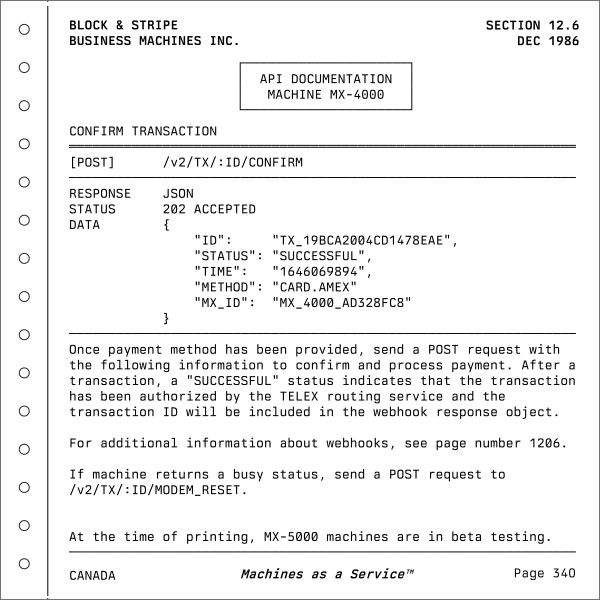 Berkeley Mono specimen from the official website
As the introduction suggests, the typeface reminds me of man pages, telephone books, and vintage technical documentation. The foundry’s website also reflects that aesthetic.
Berkeley Mono is a commercial typeface. Curiously, however, some of those coding agents appear to be using it without a license, which has led the foundry to frequently tag them on X1.
-
The type foundry’s posts on X: Claude uses Berkeley Mono, Cursor uses Berkeley Mono ↵ ↵