 Zilong's Tech Notes
 Notes on "coding agents"
Two articles on sandboxing for AI agents:
- A field guide to sandboxes for AI, and Simon Willison’s comment to it
- The surprising attention on sprites, exe.dev, and shellbox
Individuals I’m following, who actively write and contribute in the AI field:
- Simon Willison. A must-read in this field now. He’s been topping Hacker News in 2023–20251. I can’t believe how he manages to cover nearly every aspect of the frontier. If you could only follow one source, make it him. He’s also the co-creator of the famous Django web framework.
- Armin Ronacher. He’s the creator of a lot of Python libraries, like Flask and Click. Now he’s writing a lot about LLMs.
- Mario Zechner. I discovered him through his tiny but curated coding agent Pi, which has been turning heads recently2. I haven’t taken a look yet, but will do.
- Mitchell Hashimoto. Ghostty’s creator. He’s writing a lot about his AI adoption in real development.
-
Simon Willison’s post: The most popular blogs of Hacker News in 2025 ↵
-
Armin wrote about it: Pi: The Minimal Agent Within OpenClaw ↵
Ralph Wiggum as a “software engineer”. The AI field is evolving so fast like your math classes in high school, that if you miss a week, you’re suddenly lost. For me recently, it’s Ralph, a new pattern for coding agents that pushes them to a higher automation level.
Its name comes from a character called Ralph Wiggum in the show The Simpsons, who somehow captures the spirit of this technique.
To get familiar with Ralph, I skimmed (and watched) these materials, in addition to the original post by Geoffery Huntley:
- Matt Pocock’s walkthroughs: Ship working code while you sleep with the Ralph Wiggum technique, and 11 Tips For AI Coding With Ralph Wiggum
- Greg Isenberg’s video: “Ralph Wiggum” AI Agent will 10x Claude Code/Amp
- Ryan Carson’s article on X: Step-by-step guide to get Ralph working and shipping code
In short, Ralph is a technique that runs your coding agent sessions in a loop. It pushes the typical coding agent workflow — you give it a task, watch it work, and then a new task based on its output — forward by making the agent itself assess the outputs and decide what’s next. Back in 2025, we’ve got the agreement that an “agent” is simply an AI program running tools in a loop to achieve a goal1. Ralph extends that idea naively: It’s a bash script running agent sessions in a loop to achieve a goal.
To run agents the Ralph way, you basically need the following harnesses:
- A bash script that simply runs your coding agent in a for loop
- A PRD file that lists and tracks the tasks, commonly organized as
prd.json - A progress note that the agent appends to when completing tasks, providing relevant context to the next agent session, commonly organized as
progress.txt
These elements reveal what’s truly valuable about the Ralph idea: It formalizes a context engineering approach when tackling large scale development requirements. And that’s why Ralph differs from just using a single agent session for all tasks. Every time the session completes a task, it checks the tasks in prd.json, appends notes to progress.txt, and usually makes a git commit. Then a new agent session starts with the context window cleared, so the files the last session updated serve as the only memory of the Ralph loop.
Rough notes here. If you’re interested in the details, check the materials above. It’s indeed a new idea in the field and the community will explore it further to see if it’ll truly stand out.
-
Simon Willison’s well-known article: I think “agent” may finally have a widely enough agreed upon definition to be useful jargon now ↵
I now use ChatGPT and Amp in a very simple way: I just create new threads and leave them as-is.
Previously for ChatGPT, I created several projects, and when I wanted to talk to it, I’d find and continue a relevant existing thread or create a new one in a project. I’d organize them periodically. Turns out it just looked neat but didn’t actually help. Now I just start a new chat when I think I need to. ChatGPT memorizes context automatically, which is sufficient.
Similarly for Amp, I used to organize my threads very carefully. After the labels feature shipped1, I started to label every thread manually after I completed one. I finally realized this practice doesn’t help — for now. So I deleted all the labels. And when to make a thread public? When I find I need to.
When you start using a tool, use it with the least friction and in the most intuitive way. Any feature that forces redundant manual work isn’t worth the hassle. Only use a feature if you find you need to.
-
Amp news: Thread Labels ↵
Agent Skills (via). Anthropic published Agent Skills as an open standard yesterday1, just a few days after they co-founded the Agentic AI Foundation and donated the MCP (Model Context Protocol) to it2. Now, along with the widely adopted AGENTS.md, there are three major agentic AI patterns for managing context and tools.
Among the three, AGENTS.md is the simplest and most straightforward one, which is essentially a dedicated README.md for coding agents. It is usually loaded in the context window when starting a session, providing general instructions to help coding agents know the user and the workspace better.
It originated from OpenAI to unify the chaotic name conventions of agent instruction files, before which we had .cursorrules for Cursor, .github/copilot-instructions.md for GitHub Copilot, GEMINI.md for Gemini CLI, etc. It has been gradually adopted by almost all coding agents, except Claude Code, which still insists on its CLAUDE.md. (There’s an open issue though.)
Agent Skills is another neat practice. Introduced by Anthropic in October 20253, it is a composable and token-efficient way to provide capabilities to agents. LLMs can call tools, and Agent Skills is just a simple and standardized way to define a set of tools. A skill is a set of domain-specific instruction files, which can be loaded on demand by the agent itself. Besides instructions in Markdown, a skill can also bundle a set of scripts and supplementary resource files, enabling the agent to run deterministic and reproducible tasks.
Amp, my current coding agent choice, just released the support for Agent Skills earlier this month4. Along with Agent Skills becoming an open standard, GitHub Copilot and VS Code announced their support for it5. Also, Dax, one of OpenCode maintainers, committed to adding support in the upcoming days6. Though, the skills folder name convention is still not unified, .claude/skills for Claude Code, .github/skills for GitHub Copilot, and .agents/skills for Amp. I’d like to see the neutral .agents/skills win.
Compared with these two approaches, MCP is way more complex. It uses a server-client architecture and JSON-RPC to communicate, instead of natural language — the native language of LLMs. An MCP server can provide remote tools, resources and pre-built prompts to the MCP client baked in an agent, enhancing the agent’s capabilities. It was introduced by Anthropic at the end of 20247, and after one year of adoption, its limitations like authorization overhead and token inefficiency have started to emerge, not to mention its difficulty to implement and integrate. In fact, the only MCP server that is still catching my eye is Playwright MCP, which simply gives the browser automation superpower to coding agents. Honestly I didn’t manage to find a chance to try out MCP deeply. Opinions here are merely my observations and largely shaped by discussions on it, like Simon Willison’s post.
Personally, I’m already adopting AGENTS.md globally and in my personal projects. Since Agent Skills becomes more and more promising, I’m looking forward to trying it out, diving deeply, and building my own set of skills.
-
Claude blog: Skills for organizations, partners, the ecosystem ↵
-
Anthropic news: Donating the Model Context Protocol and establishing the Agentic AI Foundation ↵
-
Claude blog: Introducing Agent Skills ↵
-
Amp news: Agent Skills ↵
-
GitHub blog: GitHub Copilot now supports Agent Skills ↵
-
Anthropic news: Introducing the Model Context Protocol ↵
Berkeley Mono (via). Looks like major coding agents like Claude Code, Cursor, and Amp (which I mainly use these days) are all using this monospaced typeface on their social media1 and web pages2. The typeface looks great and indeed has a retro-computing charm. The type foundry, US Graphics Company, also introduces it as “a love letter to the golden era of computing”:
Berkeley Mono coalesces the objectivity of machine-readable typefaces of the 70’s while simultaneously retaining the humanist sans-serif qualities. Inspired by the legendary typefaces of the past, Berkeley Mono offers exceptional straightforwardness and clarity in its form. Its purpose is to make the user productive and get out of the way.
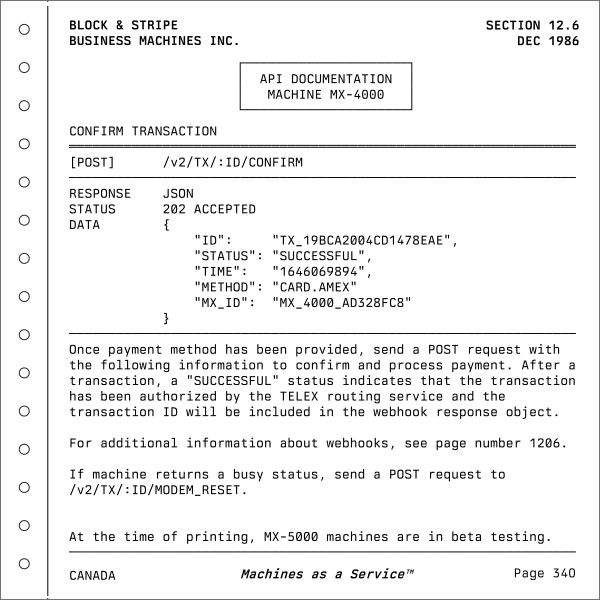 Berkeley Mono specimen from the official website
As the introduction suggests, the typeface reminds me of man pages, telephone books, and vintage technical documentation. The foundry’s website also reflects that aesthetic.
Berkeley Mono is a commercial typeface. Curiously, however, some of those coding agents appear to be using it without a license, which has led the foundry to frequently tag them on X1.
-
The type foundry’s posts on X: Claude uses Berkeley Mono, Cursor uses Berkeley Mono ↵ ↵